Drive Weather With Live Radar
- 4.6
- Rating
- 100.00K
- Installs
- Free
- Price
 Analysis by App-foxy
Road trips are easy to plan when the weather is calm, but the useful question changes once rain, snow, strong wind, or rapidly shifting conditions enter the picture. I found Drive Weather With Live Radar most useful in that gap between a normal forecast and the practical decision of whether a route still makes sense. It is a free weather app from Concept Elements Inc. that focuses on what may happen along the road rather than only what is happening at your destination.
That difference matters. A standard weather app may tell me that my destination will be wet at three in the afternoon, while this app encourages me to think about the drive as a sequence of changing conditions. I can look at weather along the route, check live radar, and pay attention to wind, snow, and broader road conditions before leaving. I would not treat it as an automatic driving decision-maker, but I do see it as a useful second layer between a general forecast and my own judgment.
How the app feels when the route depends on a live connection
The central strength of this weather app is also the reason connectivity matters so much. Live radar and route-based conditions are valuable because they can change while I am planning or traveling. When the connection is working, the experience feels more relevant than opening a weather app, searching for a city, and mentally filling in the long stretch of road between two points.
You May Also Like

 Blood Strike: 2.5 Anniversary
Blood Strike’s Loadouts Turn Every Drop Into a Tactical Gamble
A close look at Blood Strike’s custom loadouts: how fast access to signature weapons reshapes its battle royale rhythm, rewards preparation, and narrows the gap between fights.

 Pandora - Music & Podcasts
Pandora’s Music Is Easy to Start, but Harder to Recover
Pandora’s strength is its low-effort path from a seed to a station. Its weak spot is how much confidence it asks you to place in connection, setup, and quiet recovery.

 8 Ball Pool
 Is Built on Rivalries, Rematches, and Routine
A close look at the rivalries, rematches, shared routines, and unanswered safety questions that turn a quick pool match into a persistent mobile community.

 Samsung Music
’s Quiet Strength Is Playing What You Already Own
Its reach comes less from spectacle than from dependable access to a personal library. That simplicity is both the app’s strongest retention engine and its ceiling.

 AccuWeather: Weather Radar
AccuWeather Review: A Quick, Clear Forecast for Everyday Decisions
For everyday plans, the best forecast is the one you can understand quickly. AccuWeather makes rain timing, radar, and local conditions easy to act on, with a few trade-offs.

 Hill Climb Racing
Why Hill Climb Racing Still Turns Crashes Into One More Run
A tiny car, a bumpy hill and one more upgrade: Hill Climb Racing keeps resurfacing because its simple chaos makes every near-miss feel personal.
More From Our News Desk
View All News


I especially like the route perspective for trips that cross several towns or weather zones. A destination forecast can hide an uncomfortable section halfway through the journey. Drive Weather With Live Radar gives the planning process a more road-focused shape: I am not only asking whether the final stop is comfortable, but whether the drive contains a band of rain, a snowy section, or wind that deserves extra time and attention.
That live aspect also means I would check the app at deliberate moments rather than leave it open constantly. Before starting, I would review the route and look for areas where conditions appear likely to deteriorate. During a break, I would check again if the sky has changed or if travel is taking longer than expected. This is safer and more practical than trying to study a screen while driving.
One subtle advantage is that the app changes the way I think about timing. If a route has a difficult weather pocket, leaving earlier is not automatically the best answer. The better choice may be to wait, stop before the affected area, or choose a different route. The app does not replace that decision, but its route-centered information makes those options easier to consider.
There is an important limitation here: a live weather experience is only as dependable as the connection available at the moment I need it. A weak signal, a busy network, or a long stretch with poor coverage can make refreshing information awkward. I would never begin a remote trip assuming that every screen will update perfectly throughout the journey. The sensible workflow is to check conditions before departure, review them during safe stops, and keep ordinary navigation and road-safety habits in charge.
A realistic morning commute
Imagine a weekday drive that normally feels routine but crosses an exposed bridge and a rural stretch before reaching the city. The destination forecast says light rain, which sounds harmless. In Drive Weather With Live Radar, I would look at the route rather than stop at the city forecast. If the radar shows a heavier band approaching the bridge, and the wind information suggests the exposed section may be uncomfortable, I have a more useful basis for leaving earlier or postponing the trip.
The practical value is not that the app tells me exactly what to do. Its value is that it exposes the part of the journey that a single-location forecast can overlook. That is one of the clearest reasons I would recommend it to someone who drives between towns, commutes across open terrain, or regularly plans trips where conditions vary from one section of road to another.
Using it from the passenger seat, at stops, and before departure
I would not use this as a hands-on driving companion in the sense of constantly interacting with the phone behind the wheel. Weather information needs attention, and radar maps are particularly poor material for quick glances while moving. The best mobile context is before departure, while parked, or from the passenger seat when someone else is handling the car.
Before leaving, I would give myself enough time to examine the full route instead of checking only the first part. That is where the app can provide more value than a familiar weather widget. A widget is excellent for a quick local glance, but it usually does not encourage me to inspect the weather progression along a journey. Here, the route itself becomes the object of the forecast.
At a fuel stop or rest area, I would use the app as a checkpoint. This is particularly useful when a trip has already fallen behind schedule. A delay can move the driving window into a different part of the weather pattern, so the forecast I saw at breakfast may no longer answer the question I have at lunch. A safe stop gives me a chance to reassess without turning the phone into a distraction.
For passengers, the app can support a useful division of responsibility. The driver can concentrate on the road while the passenger checks how conditions develop ahead. I would still treat the information as advisory rather than authoritative. Radar and forecasts help me notice patterns, but they do not describe every local hazard, road closure, visibility problem, or sudden change that may occur between updates.
It is also worth being realistic about screen size. A phone is convenient, but a detailed weather map can be harder to read than it appears in a store screenshot. I prefer to use it for a focused question: where is the worst weather relative to my route, and is it moving toward the road? I would avoid repeatedly zooming and panning without a clear purpose, especially when standing beside a busy road or trying to make a quick decision.
People who want a simple temperature and precipitation glance may find the route focus more than they need. If I only want to know whether to carry an umbrella for a short walk, a conventional local forecast is faster. This app earns its place when the journey itself matters and when weather along the way could affect timing, comfort, or safety.
What I would check first
My first pass would be short and consistent. I would enter or review the intended journey, inspect the weather progression rather than only the endpoint, and look for a combination of rain, snow, wind, and changing conditions. I would then compare what I see with the time I expect to reach each part of the route.
That last step is easy to miss. A weather map is not automatically a travel plan. If I leave at one time but arrive at a difficult section much later than expected, the conditions may be different. Traffic, breaks, vehicle limitations, and road work can all change the timing. The app is most useful when I use it to test a plan, not when I assume the first forecast view is a guarantee.
What happens when the forecast changes or the connection fails
Weather apps are judged not only by attractive maps but by how well they support uncertainty. In my view, Drive Weather With Live Radar is strongest when I use it as part of a recovery routine. If a route begins to look worse, I can stop thinking in terms of a single yes-or-no decision and consider smaller adjustments: delay departure, take a break before the affected area, shorten the day, or choose a less exposed route if another option is available.
That workflow is more valuable than chasing perfect certainty. Radar can show a developing pattern, but it cannot promise that the road will feel exactly as the screen suggests. I would pair the app with official local warnings and common-sense observation. If visibility is poor, roads are icy, or driving feels unsafe, the correct response is not to keep refreshing the app for permission to continue.
Connectivity failures deserve the same practical attitude. If the app cannot refresh at the moment I check it, I would not repeatedly tap the screen while moving. I would use the last useful information I already reviewed, stop somewhere safe, and rely on other available sources or local guidance. For a remote trip, I would plan with the assumption that live updates may become intermittent. That is not a criticism unique to this app; it is the trade-off built into live weather information on a mobile device.
A good recovery habit is to make the important decision before the connection becomes unreliable. If the forecast shows a difficult stretch ahead, I would decide in advance where I can stop and what conditions would make me change plans. This turns the app from a reactive screen into a planning tool. It also reduces the temptation to make a complicated judgment in a poor-signal area, at night, or while traffic is moving quickly.
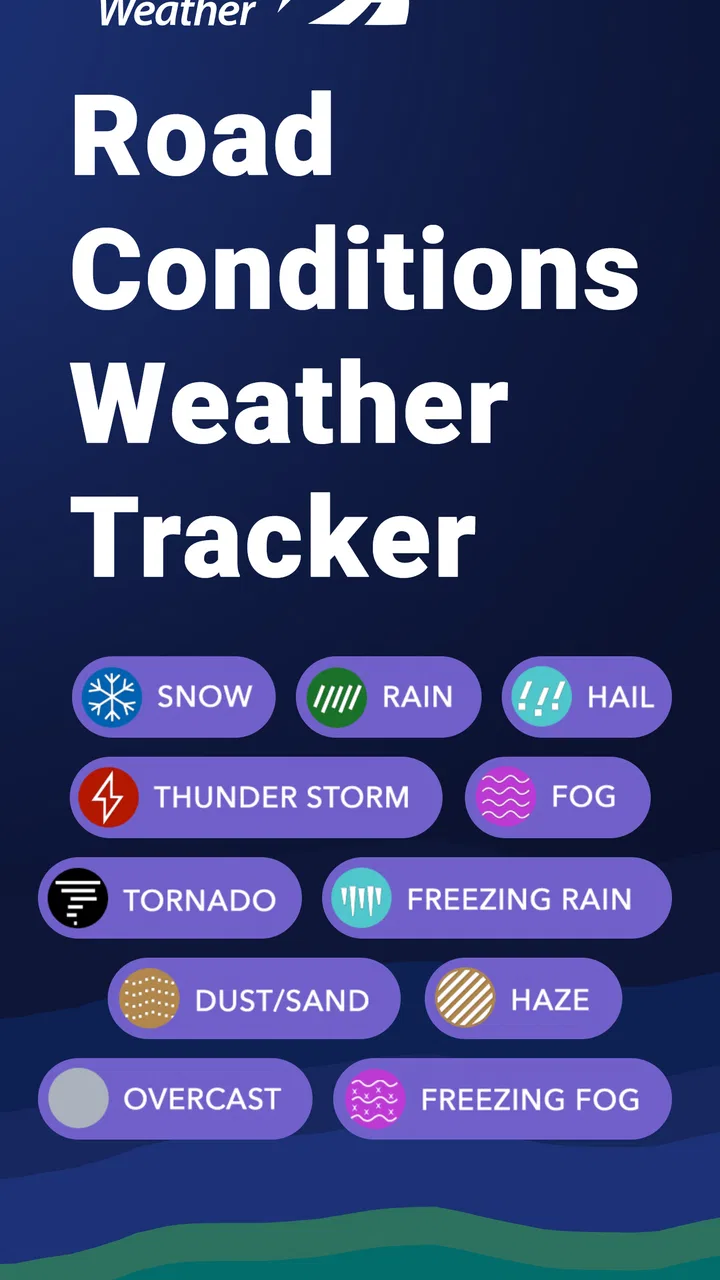
The app should not be confused with a road-closure service or an emergency communication tool. Its focus is weather along the drive, including radar, wind, snow, and conditions that can influence travel. That makes it useful for awareness, but I would still check local transport information when a storm, flood, or major snowfall is involved. Weather context and official road status answer different questions.
Keeping mobile data use sensible
Because the experience centers on live maps and changing conditions, I would use it selectively when managing mobile data or battery matters. I would load the route and inspect the relevant weather before leaving, then avoid leaving animated radar running for the entire trip. A quick review at a safe stop is more purposeful than continuous monitoring, and it keeps the phone available for navigation and communication.
I would also avoid treating every visual change as a reason to refresh. If the route is short and the weather is stable, one pre-trip check may be enough. If the journey is long or conditions are developing quickly, scheduled checks at breaks make more sense. This is one of the less obvious trade-offs of a live radar app: more information is not always better if it encourages constant attention to the phone.
For people with limited data plans, the app may require more discipline than a text-based forecast. I would use Wi-Fi before departure when convenient, inspect only the route and time window that matter, and stop refreshing once I have made a sensible decision. I would not promise that this eliminates data use, but it is a practical way to keep a live weather tool from becoming an unnecessary background activity.
Who will get the most from it
I think this app is a strong match for drivers who regularly travel beyond one local area. It makes particular sense for commuters crossing county lines, families taking long weekend drives, delivery workers planning several stops, and anyone who has been caught by weather that was mild at home but unpleasant halfway to the destination. The route view gives those users a reason to open it instead of relying only on a home-screen forecast.
It can also help drivers of vehicles that are more sensitive to conditions. Strong wind, snow, and changing precipitation may affect a high-profile vehicle, a motorcycle, or a car with limited winter capability differently from a normal dry-weather journey. The app does not calculate those vehicle-specific risks for me, but it helps me notice when the surrounding weather deserves a more conservative plan.
I would be less enthusiastic about recommending it to someone who wants a minimalist weather utility. If the only question is whether it will rain in one neighborhood, a standard weather app may be quicker and easier. I would also hesitate to make it the only tool for severe-weather travel, remote expeditions, or situations where official warnings and road-status information are essential.
Compared with a typical weather app, the trade-off is clear. The usual alternative is often better for a fast local snapshot, daily routine, or simple forecast check. Drive Weather With Live Radar is more useful when the road is the subject. Compared with a navigation app, it offers weather context that navigation systems may not present with the same emphasis, but it should not be expected to replace navigation, traffic information, or official travel alerts.
Cost, access, and the current experience
The app is free to install and is rated for Everyone, which makes it approachable for households where several people may need a road-weather tool. It has reached over one hundred thousand installs and holds a 4.6 average from around one thousand four hundred ratings, with more than six hundred written reviews. Those figures suggest a healthy level of interest, although I would still judge it by whether its route-focused approach fits my own travel habits.
There are in-app purchases ranging from $5.99 to $19.99 per item. I would look carefully at what is included before paying, especially if I only need occasional weather checks. A frequent road traveler may find extra functionality worthwhile, while a casual user may be satisfied with the free starting point. Since the app’s main benefit is situational, the right value question is not whether every feature is necessary, but whether it improves decisions on the routes I actually drive.
The app was released on December 28, 2018, and the current version is 11.4.1. It requires Android 7.0 or later. For someone using an older phone, compatibility is therefore worth checking before planning around it. More broadly, I would keep the app updated when possible because live weather tools depend on a smooth relationship between the interface, current data, and the phone’s operating system.
My connectivity verdict
After using it as a route-planning weather tool, I see Drive Weather With Live Radar as a focused companion rather than a complete travel command center. Its best idea is simple but meaningful: weather should be considered along the drive, not only at the place where the trip ends. That makes it more useful than a basic local forecast when rain, snow, wind, or changing conditions could alter the journey.
The connection-dependent nature of the experience is both its appeal and its boundary. Live information can make a decision more timely, but it also asks me to plan for weak coverage, use the phone at safe moments, and avoid assuming that a refreshed map equals certainty. The smartest approach is to check before departure, reassess during proper stops, and combine the app with official warnings and direct observation.
I recommend it to drivers who want weather context built around a route, not just a destination. I would skip it if I only needed a quick local forecast or if I expected one app to provide every navigation, emergency, and road-closure answer. For the right traveler, though, its route-first perspective can reveal the inconvenient part of a journey before it becomes a surprise on the windshield.
FAQs for Drive Weather With Live Radar
01What features does Drive Weather With Live Radar offer?
Drive Weather With Live Radar provides real-time weather updates, live radar images, and forecasts tailored specifically for drivers. It helps users plan their routes with weather conditions in mind, offering alerts for severe weather, precipitation forecasts, and temperature changes along your route, ensuring a safer and smoother travel experience.
02Is Drive Weather With Live Radar available for both Android and iOS?
Yes, Drive Weather With Live Radar is available on both Android and iOS platforms. Users can download the app from the Google Play Store for Android devices and the Apple App Store for iOS devices, making it accessible to a wide range of smartphone users who are looking to plan their journeys with accurate weather information.
03Does the app require a subscription or in-app purchases?
Drive Weather With Live Radar offers both free and premium features. While the basic version provides essential weather updates and radar features, subscribing to the premium version unlocks advanced features such as extended forecasts, ad-free usage, and additional map overlays. Users can choose based on their needs and budget.
04How accurate is the weather data provided by the app?
The app leverages multiple reliable weather data sources to provide accurate and up-to-date information. It uses real-time radar updates and forecasts to ensure users receive the most current weather conditions. However, like any weather app, there may be occasional discrepancies, so users are encouraged to use it as a guide rather than an absolute source.
05Can Drive Weather With Live Radar be used offline?
Drive Weather With Live Radar requires an internet connection to provide the most accurate real-time updates and radar images. While some basic features may be accessible offline, for optimal use and to receive the latest weather updates, users should ensure they have a stable internet connection during their travels.
Pros
- Intuitive interface for easy navigation.
- Accurate weather updates and forecasts.
- Customizable alerts for severe weather.
- Wide range of route options available.
- Real-time radar for precise tracking.
Cons
- Requires constant internet connection.
- Limited offline functionality.
- Ads can be intrusive at times.
- Premium features locked behind paywall.
- Battery consumption is relatively high.

Drive Weather With Live Radar
Gallery